amy
AMY Synthesizer Details
Please see our interactive AMY tutorial for more tips on using AMY
- AMY Synthesizer Details
- Oscillators, voices, patches and synths
- CtrlCoefficients
- AMY’s sequencer and timestamps
- Core oscillators
- LFOs & modulators
- Distortion
- Filters
- EQ & Volume
- Envelope Generators
- Audio input and effects
- FM & ALGO type
- Build-your-own Partials
- Interpolated partials
- How groups of oscs are controlled together
- PCM and Sampler
Oscillators, voices, patches and synths
Here’s a diagram of how AMY manages oscillators, and synths. This is an example of a six polyphony Juno-6 synth. Each voice represents one unit of polyphony, and the 5 oscillators that are needed to make up the voice. The synth manages 6 voices:

AMY’s lowest level of control is the oscillator - a single waveform that you can define a number of parameters for, apply filters, frequency, pan, etc. By default AMY ships with support for 180 oscillators running at once. (You can increase this with amy_config.)
We then provide voices, to make it easier to configure and use groups of oscillators in coordination. For example, each Juno-6 note is generated by a single voice made from 5 oscillators.
You then manage a set of voices using a synth, which takes care of allocating available voices to successive notes. For example a Juno-6 synth can play 6 notes of a patch at once. The synth in AMY allocates 6 voices, each with 5 osc, and handles note stealing and parameter changes.
You configure the voices in a synth by using a patch, which is a number referring to a stored list of AMY commands that set up one or more oscillators. You can assign any patch to any synth, or set up multiple synths to have the same patch, and AMY will allocate the oscillators it needs under the hood.
(Note that when you use voices/synths, you’ll need to include the synth arg when addressing oscillators, and AMY will automatically route your command to the relevant oscillators in each voice of the synth’s set – there’s no other way to tell which oscillators are being used by which voices.)
To play a patch – for instance the built-in patches emulating Juno and DX7 synthesizers and a piano – you create a synth configured with that patch, then send note events, or parameter moidifications, to the synth. We ship patches 0-127 for Juno, 128-255 for DX7, 256 for our built-in piano, and – on devices with the Gamma9001 drum banks (Tulip, AMYboard, AMY on the web, the CPython amy module) – seven GM drum kits at patches 384-390 (see Drum kits). For example, a multitimbral Juno/DX7 synth can be set up like this:
amy.send(synth=1, num_voices=4, patch=1)     # 4 voices of Juno patch #1 on synth 1
amy.send(synth=2, num_voices=4, patch=129)   # 4 voices of DX7 patch #2 on synth 2
amy.send(synth=1, note=60, vel=1)            # Play note 60 on one of the Juno voices
amy.send(synth=1, osc=0, filter_freq=8000)   # Open up the filter on the Juno voices
                                             # (Juno patches implement the VCF on osc 0)
The code in amy/headers.py generates these patches and bakes them into AMY so they’re ready for playback on any device. You can add your own patches at compile time by storing alternative wire-protocol setup strings in patches.h, or by making user patches at runtime (see User patches below).
Synths
A common use-case is to want a pool of voices which are allocated to a series of notes as-needed. This is accomplished with synths. You associate a synth number with a set of voices by providing the patch number when initializing the synth; the synth arg becomes a smart alias for passing note events to one of its voices (or configuration changes to all of them), e.g.
amy.send(synth=0, num_voices=3, patch=1)     # 3-voice Juno patch #1 on synth 0
# Play three notes simultaneously
amy.send(synth=0, note=60, vel=1)
amy.send(synth=0, note=64, vel=1)
amy.send(synth=0, note=67, vel=1)
# To play a 4th note, the synth 'steals' the oldest voice, i.e. the one that was playing note 60
amy.send(synth=0, note=70, vel=1)
# We can send note-offs to individual notes
amy.send(synth=0, note=70, vel=0)
# .. or we can send note-offs to all the currently-active synth voices by sending a note-off with no note.
amy.send(synth=0, vel=0)
# Once a synth has been initialized and associated with a set of voices, you can use it alone with patch
amy.send(synth=0, patch=13)  # Load a different Juno patch, it will remain 4-voice.
# You can also use `patch_string` to directly define a patch using a wire-command string.
amy.send(synth=0, num_voices=3, patch_string=amy.message(wave=amy.TRIANGLE, bp0='0,1,1000,0,1000,0'))
# You can release all the voices/oscs being used by a synth by setting its num_voices to zero.
amy.send(synth=0, num_voices=0)
# Each synth has an overall level (`synth_level`, wire code `iV`), default 1.0,
# applied to all of its oscs' audio output at render time. It's a master volume
# for the synth, independent of any osc amp settings (and the natural way to
# scale a drum-kit synth, whose per-drum oscs each carry their own amp):
amy.send(synth=0, synth_level=0.5)
# Patches 258 and 384-390 are General MIDI drum synth kits (see the Drum kits section).
# They include special flags that will translate GM note events into PCM presets.
amy.send(synth=10, patch=384)
amy.send(synth=10, note=38, vel=1)  # acoustic snare (GM note numbers)
amy.send(synth=10, patch=389)       # hot-swap the synth to the 80s Power Kit
Note 1: Although note can take on real values – e.g. note=60.5 for 50 cents above C4 – the voice management tracks voices by integer note numbers (i.e., midi notes) so it rounds note values to the nearest integer when deciding which note-off goes with which note-on. Note also that note-on events that also set the preset parameter (e.g. to select PCM samples) will fold the patch number into the note integer used as the key for note-on, note-off matching.
Note 2: note-on events to synths (or their component voices) have a specific behavior: amy.send(synth=0, osc=0, note=48, vel=1) sends a note-on to osc 0 within the synth voice; for a typical patch, this will trigger all the sounding oscs if they are chained via chained_osc. However, amy.send(synth=0, note=48, vel=1) (no osc parameter) will send note-ons to all the oscs in that voice, not just osc 0. When all the sounding oscs were already chained together, this has the same effect (since the oscs already received the note-on). But if your voice contains multiple, independent oscs, they will all be triggered. For instance,
amy.reset()
amy.send(synth=1, num_voices=2, oscs_per_voice=2)
amy.send(synth=1, osc=0, wave=amy.SINE, freq=440)  # These are all defaults, so this line is not needed.
amy.send(synth=1, osc=1, wave=amy.SINE, freq=660)  # Non-default freq
amy.send(synth=1, note=60, vel=1)
.. will sound two sine tones a fifth apart, even though the two oscs are not chained and we only issued a single note-one.
Note 3: an osc number in a command addressed to a synth is relative to the voice, not absolute – osc=1 means the second osc of each of that synth’s voices, wherever those oscs happen to live. The same goes for a parameter that names another osc: mod_source, chained_osc and algo_source are voice-relative too, so amy.send(synth=1, osc=0, mod_source=1) means “modulate osc 0 from osc 1 of the same voice”.
An osc number that lands outside the voice is refused: AMY prints a message naming the parameter and ignores it, and the rest of the command still applies. There is no useful reading of a reference past the end of a voice – the oscs beyond it belong to the synth’s other voices, or to another synth entirely – so a synth with one osc per voice cannot modulate itself from a neighbour’s oscillator by asking for mod_source=1. Commands sent without a synth address oscs absolutely and are not bounded this way.
Changing a synth’s voice count
You can change num_voices on a synth that is already running. The synth keeps the sound it has at that moment, including any changes you made since loading its patch:
amy.send(synth=0, num_voices=1, patch=1)
amy.send(synth=0, osc=0, filter_freq=2000, resonance=4)  # tweak the live synth
amy.send(synth=0, num_voices=4)                          # 4 voices of the TWEAKED sound
Changing the voice count rebuilds all of the synth’s voices by copying one of the existing voices into the new ones, so every osc setting the synth currently holds comes along. Note and velocity aren’t part of an osc’s configuration, so resizing a synth while it’s playing copies the sound, not the notes. A synth with no patch at all – one built with oscs_per_voice or a patch_string and then configured osc by osc – resizes like any other.
To load a different sound, name it: amy.send(synth=0, patch=13), or a fresh patch_string, replaces the voices’ configuration.
A synth built from a patch_string carries no patch number: the number AMY assigns internally is released as soon as the patch is loaded, so it never occupies a user patch slot. A bare MIDI program change on such a channel therefore selects from bank 0, the Juno patches. A synth sitting on a numbered patch – built-in, or one of your own at 1024+ – infers its bank from that number.
User patches
You can create your own patches at runtime and use them for synths with a sequence of amy.send(patch=PATCH_NUMBER, <configuration commands>) where PATCH_NUMBER is a number in the range 1024-1055. Without patch=PATCH_NUMBER, this command would directly configure an oscillator, but when patch is present, it instead appends the command to the stored patch configuration. You can accumulate any number of commands into a single patch; you reset the patch with amy.send(patch=PATCH_NUMBER, reset=amy.RESET_PATCH).
So you can do:
>>> import amy; amy.live()  # Not needed on Tulip.
>>> amy.send(patch=1024, reset=amy.RESET_PATCH)
>>> amy.send(patch=1024, osc=1, wave=amy.SINE, freq=0.25, phase=0.5, amp=0.5)  # "Pitch sigh" modulator.
>>> amy.send(patch=1024, osc=0, wave=amy.SINE, freq='440,1,0,0,0,1', bp0='0,1,500,0,0,0', mod_source=1)  # decaying sine modulated by sigh.
>>> amy.send(synth=0, num_voices=1, patch=1024)
>>> amy.send(synth=0, vel=2, note=50)
AMY infers the number of oscs needed for the patch from the cumulated commands. If you store a new patch over an old one, that old memory is freed and re-allocated. (We rely on malloc for all of this.)
Loading DX7 sysex (.SYX) files as user patches
amy.fm converts DX7 patches straight from sysex data into a user patch, on any platform AMY’s Python runs on (including Tulip and AMYboard). Hand fm.load_syx() the bytes of a .SYX file — the common 32-voice bank sysex, a single-voice sysex, or raw packed (128-byte) / unpacked (155-byte) voice data — or a base64 string of any of those, which is handy for pasting a patch into a self-contained script or AMYboard sketch:
>>> from amy import fm
>>> syx = open('ROM1A.SYX', 'rb').read()
>>> fm.syx_names(syx)                             # list the 32 voice names in the bank
['BRASS   1 ', 'BRASS   2 ', ...]
>>> fm.load_syx(syx, voice=10, patch=1024)        # store voice 10 as user patch 1024
'E.PIANO 1 '
>>> amy.send(synth=1, num_voices=6, patch=1024)   # and play it
>>> amy.send(synth=1, note=60, vel=1)
You can do something very similar directly into a synth, provided it has been initialized with the correct number of oscs. So we could get the same final synth as above with these commands:
>>> amy.send(synth=0, num_voices=1, oscs_per_voice=2)  # We will be using 2 oscs per voice.
>>> amy.send(synth=0, osc=1, wave=amy.SINE, freq=0.25, phase=0.5, amp=0.5)  # "Pitch sigh" modulator.
>>> amy.send(synth=0, osc=0, wave=amy.SINE, freq='440,1,0,0,0,1', bp0='0,1,500,0,0,0', mod_source=1)  # decaying sine modulated by sigh.
>>> # Ready to play!
>>> amy.send(synth=0, vel=2, note=50)
Control Coefficients
On many synths (like this SH-101), you’ll see a row of sliders that impact which control signal(s) can modify a parameter. Here the SH-101 lets you control the VCF (filter) by a constant frequency (FREQ), ADSR envelope (ENV), LFO or mod wheel (MOD), and keyboard note (KYBD). These slider values impact the ratio of each source’s strength in the output filter frequency.
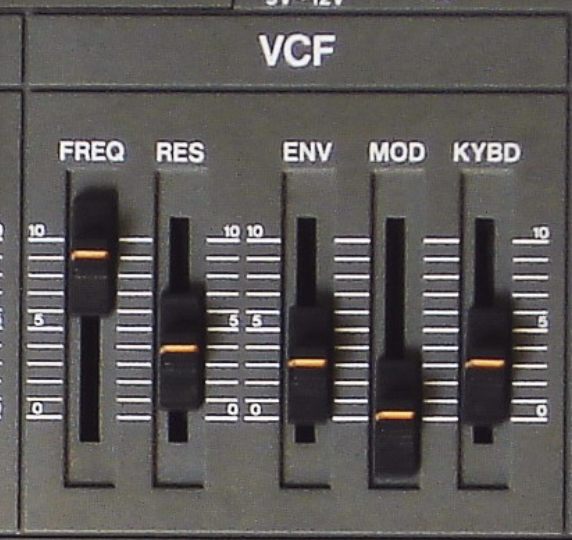
We use this style of control in AMY, called CtrlCoef or Control Coefficients. They are a list of up to 10 floats that are multiplied by a range of control signals, then summed up to give the final result (in this case, the filter frequency).
The full set of parameters accepting ControlCoefficients is amp, freq, filter_freq, duty, and pan. The control signals are:
const: A constant value of 1 - so the first number in the control coefficient list is the default value if all the others are zero.note: The frequency corresponding to thenoteparameter to the note-on event (converted to unit-per-octave relative to middle C).vel: The velocity, from the note-on event.eg0: The output of Envelope Generator 0.eg1: The output of Envelope Generator 1.mod0: The output of the first modulating oscillator, specified by themod_sourceparameter. (modis accepted as an alias, from when there was only one.)bend: The current pitch bend value (fromamy.send(pitch_bend=0.5)etc.).ext0: An external parameter, set by your code or 3rd party CV input or sensorext1: An external parameter, set by your code or 3rd party CV input or sensormod1: The output of the second modulating oscillator, i.e.mod_source=[lfo_a, lfo_b]routeslfo_bhere. It sits at the end, not next tomod0, because new control inputs are appended so that existing ones never change position.
The set 50,0,0,0,1 means that we have a base frequency of 50 Hz, we ignore the note frequency and velocity and EG0, but we also add the output of EG1. Any coefficients that you do not specify, for instance by providing fewer than 10 values, are not modified. You can also use empty strings to skip positional values, so filter_freq=',,,,1' couples EG1 to the filter frequency without changing any of the other coefficients. (Note that when we passed freq=220 in the first example, that was interpreted setting the const coefficient to 220, but leaving all the remaining coefficients untouched.)
Because entering lists of commas is error prone – and because a positional list makes you remember oddities like mod1 being coefficient 9 rather than 6 – you should prefer to specify control coefficients as Python dicts consisting of values with keys from the list above, i.e. filter_freq={'const': 50, 'eg1': 1} is equivalent to filter_freq='50,,,,1'.
You can use the same EG to control several things at once. For example, we could include freq=',,,,0.333', which says to modify the note frequency from the same EG1 as is controlling the filter frequency, but scaled down by 1/3rd so the initial decay is over 1 octave, not 3. Give it a go!
The note frequency is scaled relative to a zero-point of middle A (MIDI note 69, 440 Hz), so to make the oscillator faithfully track the note parameter to the note-on event, you would use something like freq='440,1'. Setting it to freq='880,1' would make the oscillator always be one octave higher than the note MIDI number. Setting freq='440,0.5' would make the oscillator track the note parameter at half an octave per unit, so while note=69 would still give middle A, note=81 (A5) would make the oscillator run at D#5, and note=93 (A6) would be required to get A5 from the oscillator.
The default set of ControlCoefficients for freq is {'const': 440, 'note': 1, 'bend': 1}, i.e. a base of middle A, tracking the MIDI note, plus pitch bend (at unit-per-octave). Because 440 is such an important value, as a special case, setting the first freq value to zero is magically rewritten as 440, so freq={'const': 0, 'note': 1, 'bend': 1} also yields the default behavior. amp also has a set of defaults: amp={'const': 1, 'vel': 1, 'eg0': 1}, i.e. an overall gain of 1, scaled by note-on velocity and by EG0 (which just tracks the note-on status if it has not been set up). amp is a little special in two ways. First, its const coefficient acts as an overall gain on the oscillator rather than an additive base value: 1 means full amplitude, and 0 means the oscillator is silenced entirely (it is skipped during rendering). So amp={'const': 0, ...} mutes the oscillator — if you just want velocity + EG0 control, leave const alone (it defaults to 1). Second, the nonzero components are combined in the log (dB) domain instead of being summed linearly: each control input’s 0..1 range is mapped so that 1 is full amplitude and 0 is -60dB, the coefficient-weighted values are summed in that domain, and the result is converted back to a linear amplitude, with anything at or below -60dB floored to silence. (The mod0/mod1 inputs are applied directly in the log domain, so an LFO routed to amp gives exponential tremolo around the current level.) These defaults are set up in src/amy.c:reset_osc_params(), and the combination happens in amp_combine_controls().
We also have LFOs, which are implemented as one oscillator modulating another (instead of sending its waveform to the output). You set up the low-frequency oscillator, then have it control a parameter of another audible oscillator. Let’s make the classic 8-bit duty cycle pulse wave modulation, a favorite:
amy.reset()  # Clear the state.
amy.send(osc=1, wave=amy.SINE, freq=0.5, amp=1)   # We set the amp but not the vel, so it doesn't sound.
amy.send(osc=0, wave=amy.PULSE, duty={'const': 0.5, 'mod0': 0.4}, mod_source=1)
amy.send(osc=0, note=60, vel=0.5)
You see we first set up the modulation oscillator (a sine wave at 0.5Hz, with amplitude of 1). We do not send it a velocity, because that would make it start sending a 0.5 Hz sinewave to the audio output; we want its output only to be used internally. Then we set up the oscillator to be modulated, a pulse wave with a modulation source of oscillator 1 and the duty ControlCoefficients set to have a constant value of 0.5 plus 0.4 times the modulating input (i.e., the depth of the pulse width modulation, where 0.4 modulates between 0.1 and 0.9, almost the maximum depth). The initial duty cycle will start at 0.5 and be offset by the state of oscillator 1 every tick, to make that classic thick saw line from the C64 et al. The modulation will re-trigger every note on. Just like with envelope generators, each modulation oscillator has a ‘slot’ in the ControlCoefficients - mod0 and mod1 - so it can modulate PWM duty cycle, amplitude, frequency, filter frequency, or pan! And if you want to modulate more than one thing, like frequency and duty, just specify multiple ControlCoefficients:
amy.send(osc=1, wave=amy.TRIANGLE, freq=5, amp=1)
amy.send(osc=0, wave=amy.PULSE, duty={'const': 0.5, 'mod0': 0.25}, freq={'mod0': 0.5}, mod_source=1)
amy.send(osc=0, note=60, vel=0.5)
We have some helpful patches in amy.examples, if you want to use them, or add to them. To make that filter bass, just do amy.send(synth=0, num_voices=4, patch=amy.examples.filter_bass()) and then amy.send(synth=0,vel=1,note=50) to hear it.
AMY’s sequencer and ticks
AMY provides a musical sequencer, on ticks, for both one-off future scheduling and repeating events. There’s no millisecond-based scheduling primitive – everything scheduled ahead of time is expressed in ticks, at the current tempo.
The sequencer
AMY starts a musical sequencer that works on ticks from startup. You can reset the ticks to 0 with an amy.send(reset=amy.RESET_TIMEBASE). The reset travels as an ordinary event, so you can schedule it with ticks= like anything else, and it works the same from the C amy_add_event() API. The counters restart at the next audio block boundary, which keeps the reset off the render thread’s toes; until that boundary amy.sysclock() and amy.sequencer_ticks() report the running timeline. Anything already queued for a future moment – a note-off waiting on a note-on delay, an event scheduled through the C API’s amy_event.time, anything held back by latency_ms – keeps its relative timing across the reset, so a note due 200 ms from now is still due 200 ms from now (send RESET_EVENTS too if you want them dropped).
Ticks run at 48 PPQ at the set tempo. The tempo defaults to 108 BPM. This means there are 108 quarter notes a minute, and 48 * 108 = 5184 ticks a minute, 86 ticks a second. The tempo can be changed with amy.send(tempo=120).
You can schedule an event with amy.send(..., ticks="tick,period,tag"). All three values are optional past tick:
amy.send(osc=0, wave=amy.SAW_UP, eg0="0,1,500,0,500,0")  # Pluck tone
amy.send(osc=0, note=50, vel=1, ticks=amy.sequencer_ticks() + 96)   # one-off: fires once, ~1s from now
amy.send(osc=0, note=38, vel=1, ticks="0,24,7")    # repeating, cancelable via tag 7
amy.send(osc=0, note=45, vel=1, ticks="12,24,7")   # ...adds a second event to tag 7
amy.send(ticks="0,0,7")                            # clear everything on tag 7
amy.send(osc=0, note=72, vel=1, ticks="0,24")      # repeating, not individually cancelable
amy.reset()   # Stop everything
tick can be an absolute or offset tick number. If period is omitted or 0, tick is assumed to be absolute: once AMY reaches tick, the rest of your event plays once and the saved event is removed from memory. This is also how you schedule a plain one-off event in the future – give only tick (no period, no tag) and it behaves like the old millisecond time= parameter did, except the delay is in ticks, at the current tempo. If an absolute tick is already due or overdue when the event arrives, AMY plays it immediately rather than dropping it – so a scheduling callback that runs a little late (they all do) still sounds, just a fraction of a tick behind.
You can schedule repeating events (like a step sequencer or drum machine) with period, which is the length of the sequence in ticks. For example a period of 48 with tick equal to 0 will trigger once every quarter note. A period of 24 will happen twice every quarter note. A period of 96 will happen every two quarter notes. period can be any whole number to allow for complex rhythms.
For pattern sequencers like drum machines, you will also want to use tick alongside period. If both are given and period is nonzero, tick is assumed to be an offset on the period. For example, for a 16-step drum machine pattern running on eighth notes (PPQ/2), you would use a period of 16 * 24 = 384. The first slot of the drum machine would have a tick of 0, the 2nd would have a tick offset of 24, and so on.
tag is optional. If you give one, events sent to that tag accumulate: each ticks="tick,period,tag" send adds another scheduled event under that tag, with its own tick and period, rather than replacing what was already there. So a tag names a pattern, not a single event – a whole drum part, with a different tick offset per hit, can live on one tag:
for step, note in ((0, 36), (12, 42), (24, 38), (36, 42)):
    amy.send(osc=0, note=note, vel=1, ticks="%d,48,3" % step)   # four events, one tag
You clear a tag by sending it with neither tick nor period – amy.send(ticks="0,0,tag"), the same cancel spelling as before – which drops every event stored under that tag. There is no way to remove one event from a tag while leaving its siblings, so an edit means clearing the tag and re-sending the events that survive. ticks= claims the rest of its message, so the clear has to be its own send:
amy.send(ticks="0,0,3")                                     # clear the pattern
for step, note in ((0, 36), (12, 42), (24, 40), (36, 42)):  # ...and rebuild it
    amy.send(osc=0, note=note, vel=1, ticks="%d,48,3" % step)
Tags are also what ordering is defined on: two events that land on the same tick fire in ascending tag order, and within one tag in the order you added them.
If you omitted tag when setting up the sequence (a 1- or 2-value ticks=), the event is still scheduled and still fires, but it isn’t addressable by any tag – there’s no way to cancel or replace it individually (only by something like amy.reset(), discarding all sequenced events), so only omit tag for events you don’t need to manage later.
The number of tags AMY accepts is max_sequencer_tags (default 256), and because events accumulate that same number now caps the total count of tagged events, not just the count of distinct tags. Overflowing it prints a warning and drops the new event; everything already scheduled keeps playing.
If you are including AMY in a program, you can set the hook void (*amy_external_sequencer_hook)(uint32_t) to any function. This will be called at every tick with the current tick number as an argument.
Core oscillators
We support bandlimited saw, pulse/square and triangle waves, alongside sine and noise. Use the wave parameter: 0=SINE, PULSE, SAW_DOWN, SAW_UP, TRIANGLE, NOISE. Each oscillator can have a frequency (or set by midi note), amplitude and phase (set in 0-1.). You can also set duty for the pulse type. We also have a karplus-strong type (KS=6), plus WAVETABLE when compiled with AMY_WAVETABLE that plays back 16,384 sample long wavetable packs, such as those hosted on waveeditonline.com.
Oscillators will not become audible until a velocity over 0 is set for the oscillator. This is a “note on” and will trigger any modulators or envelope generators set for that oscillator. Setting velocity to 0 sets a note off, which will stop modulators and also finish the envelopes at their release pair. velocity also internally sets amplitude, but you can manually set amplitude after velocity starts a note on.
WAVETABLE
WAVETABLE reads from wavetable presets appended to tiny PCM data at build time (guarded by #if defined(AMY_WAVETABLE)).
- Pick the table with
preset:pcm_wavetable_basetopcm_wavetable_base + pcm_wavetable_samples - 1 dutycontrols interpolation position across the 64 waveform cycles within one wavetable preset.- Internally each cycle is 256 samples; full table length is typically 16384 samples (64 complete cycles).
- You can load new wavetables using
load_sampleand use your new preset number. Ensure they are 16,384 samples long. Find more on waveeditonline.com.
Unison
An oscillator can render several detuned copies of its wave into its own output. unison (wire code C) takes up to nine values: count, spacing, offset, blend, groups, interval1, interval2, interval3, random.
count(1-8, default 1) is the number of copies.- Copy i (from 0) plays at the osc’s pitch +
offset+ i *spacingoctaves (both default 0, clamped to +/-4 octaves). blend(0-1, default 1) sets the taper: a copy at its group’s own pitch (with one group, the osc’s pitch) has weight 1, and weights fall linearly with a copy’s distance from that pitch toblendat the edge of the largest group, so a cluster centred on the note (offset = -(count - 1) * spacing / 2) tapers symmetrically. 1 gives every copy the same weight. The weights are power-normalized, so the cluster plays at about the level of one copy.- The copies share the osc’s envelope, filter, distortion, pan and modulation; note, pitch bend, portamento and pitch modulation move the whole cluster. At each note-on the copies of group 0 are spread evenly over one cycle from the osc’s phase; a group at a whole-number frequency ratio to the root, above or below (an octave, a twelfth, two octaves), starts each copy 0.211 cycle of the shared partial away from the root copy with the same index (their shared partials have exactly the same frequencies, so they would otherwise add or cancel for the whole note; at this offset a saw’s shared partials sum to the power of uncorrelated ones); other groups spread inside themselves, staggered by group. This rule is deterministic and renders identically on every note-on;
random1 draws the phases of copies 1 onward at each note-on instead, for a stack that does not restart identically. A change ofcount,groupsor an interval during a note respreads the copies from copy 0 by the same rule, a step in their phases;spacing,offset,blendandrandomdo not respread. Saw, pulse and triangle tables are re-picked every block, so they follow any of these changes. A copy other than copy 0 whose weight is 0 is not rendered. - SINE, PULSE, SAW_DOWN, SAW_UP, TRIANGLE and WAVETABLE render the cluster; other waves ignore it. Switching the osc to PCM, KS or ALGO drops the cluster’s phases with that kind’s state; switching back to one of these waves picks the cluster up again, since the unison parameters persist on the osc.
# Four saws spread over +/-20 cents (20/1200 octave) around the note, outer copies at 0.8.
D = 20 / 1200
amy.send(osc=0, wave=amy.SAW_DOWN, unison=[4, 2 * D / 3, -D, 0.8], note=48, vel=1)
groups (1-4, default 1) deals the copies in order into that many groups of consecutive copies; when count does not divide evenly, the first count % groups groups take one copy more. Copy j of each group plays at offset + j * spacing, so every group carries the same spread, and the group as a whole is transposed: group 0 stays at the osc’s pitch, group 1 moves by interval1, group 2 by interval2 and group 3 by interval3 octaves (all default 0, clamped to +/-4 octaves). blend tapers each copy by its distance from its own group’s pitch, reaching blend at the edge of the largest group. A saw, pulse or triangle group renders from the table chosen for its own highest copy, so an upper group does not alias and the root group keeps its full bandwidth; sine and wavetable groups share the osc’s table. More groups than copies deals one copy to each of the first count groups. Copies at one pitch (spacing 0 within a group) comb by their start phases instead of adding up, so a stack of distinct pitches is the groups’ job. Whatever offset, spacing and the intervals add up to, a copy’s offset from the osc’s pitch is bounded to +/-4 octaves.
# Four saws as an octave stack: a pair at +/-10 cents around the note and a pair around the octave above.
D = 10 / 1200
amy.send(osc=0, wave=amy.SAW_DOWN, unison=[4, 2 * D, -D, 1, 2, 1.0], note=48, vel=1)
The cluster takes the osc’s one pan. For a stereo cluster, put the copies on two oscs panned apart, each with half of them on an interleaved pitch grid, so each channel carries copies from across the spread; the two oscs sit one grid step apart, and an odd count gives one osc the extra copy. Each osc of the pair takes its own envelope, filter and modulation, and blend tapers within each osc over its own copies.
# Six copies over +/-20 cents as a stereo pair: osc 0 (pan 0, left) takes grid copies 0, 2, 4, osc 1 (pan 1, right) 1, 3, 5.
# A hard-panned osc lands 3 dB over a centred one, so vel 0.7.
D = 20 / 1200
G = 2 * D / 5    # grid step for six copies
for osc, pan in ((0, 0), (1, 1)):
    amy.send(osc=osc, wave=amy.SAW_DOWN, pan=pan, unison=[3, 2 * G, -D + osc * G, 1], note=48, vel=0.7)
A grouped cluster splits the same way, by position within the group: each osc of the pair keeps all the groups and takes its share of each group’s copies.
# A power stack of six saws (root, fifth and octave, each a pair at +/-10 cents) as a stereo pair.
# On one osc it is unison=[6, 2 * D, -D, 1, 3, 7 / 12, 1.0]: three groups of two copies.
# Osc 0 (left) takes copy 0 of each group (offset -D), osc 1 (right) copy 1 (offset +D),
# so each osc is three groups of one copy and its spacing has no effect.
D = 10 / 1200
for osc, pan in ((0, 0), (1, 1)):
    amy.send(osc=osc, wave=amy.SAW_DOWN, pan=pan, unison=[3, 0, -D + osc * 2 * D, 1, 3, 7 / 12, 1.0], note=48, vel=0.7)
LFOs & modulators
Any oscillator can modulate any other oscillator. For example, a LFO can be specified by setting oscillator 0 to 0.25Hz sine, with oscillator 1 being a 440Hz sine. Using the 6th parameter of ControlCoefficient lists, you can have oscillator 0 modulate frequency, amplitude, filter frequency, or pan of oscillator 1. You can also add targets together, for example amplitude+frequency. Set the mod_target and mod_source on the audible oscillator (in this case, oscillator 1.) The source mod oscillator will not be audible once it is referred to as a mod_source by another oscillator. The amplitude of the modulating oscillator indicates how strong the modulation is (aka “LFO depth.”)
Distortion
Each oscillator has a distortion stage with three waveshapers: a soft clipper (dist_clip), a wavefolder (dist_fold) and a bitcrusher (dist_crush); enabled stages stack in that order. It runs after the amplitude envelope and before the filter, so note dynamics drive it. dist_drive is the pre-gain into the shaper and dist_mix the wet/dry amount; both are ControlCoefficient lists, so an envelope, LFO or velocity can modulate them. The same stage also runs per bus, ahead of the bus effects. amy.send(osc=0, wave=amy.SAW_DOWN, freq=110, dist_clip=1, dist_drive=4, vel=1) gives a driven saw. See Distortion in AMY for the wire commands, what each shaper does, and how shaping one osc, a voice’s summed chain, or a whole bus differ.
Filters
We support lowpass, bandpass and hipass filters in AMY. You can set resonance and filter_freq per oscillator.
EQ & Volume
You can set a synth-wide volume (in practice, 0-10), or set the EQ of the entire synths’s output.
Envelope Generators
AMY allows you to set 2 Envelope Generators (EGs) per oscillator. You can see these as ADSR / envelopes (and they can perform the same task), but they are slightly more capable. Breakpoints are defined as pairs of time deltas (specified in milliseconds) and target value. You can specify up to 8 pairs, but the last pair you specify will always be seen as the “release” pair, which doesn’t trigger until note off. All preceding pairs have time deltas relative to the previous segment, so 100,1,100,0,0,0 goes up to 1 over 100 ms, then back down to zero over the next 100ms. The last “release” pair counts from ms from the note-off.
An EG can control amplitude, frequency, filter frequency, duty or pan of an oscillator via the 4th (EG0) and 5th (EG1) entries in the corresponding ControlCoefficients.
For example, to define a common ADSR curve where a sound sweeps up in volume from note on over 50ms, then has a 100ms decay stage to 50% of the volume, then is held until note off at which point it takes 250ms to trail off to 0, you’d set time to be 50ms and target to be 1.0, then 100ms with target .5, then a 250ms release with ratio 0. By default, amplitude is set up to be controlled by EG0. At every synthesizer tick, the given amplitude (default of 1.0) will be multiplied by the EG0 value. In AMY wire parlance, this would look like v0f220w0A50,1.0,100,0.5,250,0 to specify a sine wave at 220Hz with this envelope.
When using amy.py, use the string form of the breakpoint: amy.send(osc=0, bp0='50,1.0,100,0.5,250,0').
Every note on (specified by setting vel / l to anything > 0) will trigger this envelope, and setting velocity to 0 will trigger the note off / release section.
You can set a completely separate envelope using the second envelope generator, for example, to change pitch and amplitude at different rates.
As with ControlCoefficients, missing values in the comma-separated parameter strings mean to leave the existing value unchanged. However, unlike ControlCoefficients, it’s important to explicitly indicate every value you want to leave unchanged, since the number of parameters provided determines the number of breakpoints in the set. So in the following sequence:
amy.send(osc=0, bp0='0,1,1000,0.1,200,0')
amy.send(osc=0, bp0=',,,0.9,,')
.. we end up with the same effect as bp0='0,1,1000,0.9,200,0. However, if we do:
amy.send(osc=0, bp0='0,1,1000,0.1,200,0')
amy.send(osc=0, bp0=',,,0.9')  # No trailing commas.
.. we effectively end up with bp0='0,1,1000,0.9, i.e. the 4 elements in the second bp0 string change the first breakpoint set to have only 2 breakpoints, meaning a constant amplitude during note-on, then a final slow release to 0.9 – not at all like the first form, and likely not what we wanted.
Audio input and effects
By setting wave to AUDIO_IN0 or AUDIO_IN1, you can have either channel of a stereo input act as an AMY oscillator. You can use this oscillator like you would any other in AMY, apply global effects to it, add filters, change amplitude, etc.
amy.send(osc=0, wave=amy.AUDIO_IN0, vel=1)
amy.echo(1, 250, 250, 0.5, 0.5)
If you are building your own audio system around AMY you will want to fill in the buffer amy_in_block before rendering. Our included miniaudio-based system does this for you. See amychip for a demo of this in hardware.
FM & ALGO type
Try default DX7 patches, from 128 to 256:
amy.send(synth=0, num_voices=1, patch=128)  # Set up a voice.
amy.send(synth=0, note=50, vel=1)  # Play a note on the voice.
The patch lets you set which preset is used (0 to 127 are the Juno 106 analog synth presets, and 128 to 255 are the DX7 FM presets). But let’s make the classic FM bell tone ourselves, without a patch. We’ll just be using two operators (two sine waves), one modulating the other.
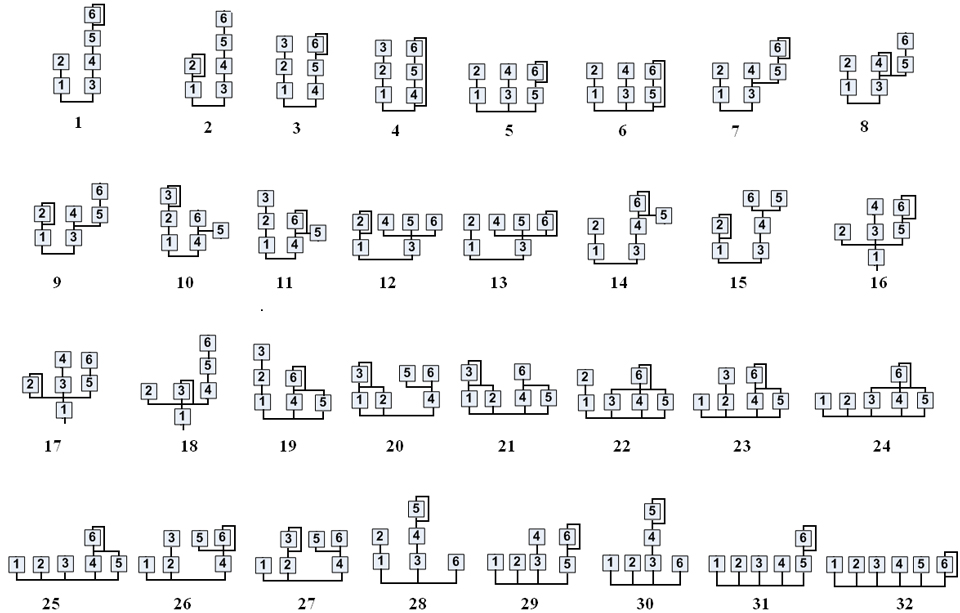
When building your own algorithm sets, assign a separate oscillator as wave=ALGO, but the source oscillators as SINE. The algorithm #s are borrowed from the DX7. You don’t have to use all 6 operators. Note that the algo_source parameter counts backwards from operator 6. When building operators, they can have their frequencies specified directly with freq or as a ratio of the root ALGO oscillator via ratio. See How groups of oscs are controlled together for how note-on, velocity and pitch reach the operators.
Please see our interactive AMY tutorial for more on setting up ALGO tones
Build-your-own Partials
You can also explicitly control partials in “build-your-own partials” mode, accessed via wave=amy.BYO_PARTIALS. This sets up a string of oscs as individual sinusoids, but it’s up to you to control the details of each partial via its parameters, envelopes, etc. You just have to say how many partials you want with num_partials. You can then individually set up the amplitude bp0 envelopes of the next num_partials oscs for arbitrary control, subject to the limit of 7 breakpoints plus release for each envelope. For instance, to get an 8-harmonic pluck tone with a 50 ms attack, and harmonic weights and decay times inversely proportional to to the harmonic number:
num_partials = 8
amy.send(osc=0, wave=amy.BYO_PARTIALS, num_partials=num_partials)
for i in range(1, num_partials + 1):
    # Set up each partial as the corresponding harmonic of 440.0
    # with an amplitude of 1/N, 50ms attack, and a decay of 1 sec / N.
    amy.send(osc=i, wave=amy.PARTIAL, freq=440.0 * i,
             bp0='50,%.2f,%d,0,0,0' % ((1.0 / i), 1000 // i))
amy.send(osc=0, note=60, vel=1)
You can add a filter (or an envelope etc.) to the sum of all the PARTIAL oscs by configuring it on the parent BYO_PARTIALS osc:
amy.send(osc=0, filter=amy.FILTER_HPF, resonance=4, filter_freq={'const': 200, 'eg1': 4}, bp1='0,0,1000,1,0,0')
amy.send(osc=0, note=60, vel=1)
# etc.
The parent osc keeps steering its partials’ pitch and amplitude for the whole note; see How groups of oscs are controlled together.
Note that the default bp0 amplitude envelope of the BYO_PARTIALS osc is a gate, so if you want to have a nonzero release on your partials, you’ll need to add a slower release to the BYO_PARTIALS osc to avoid it cutting them off.
Interpolated partials
Please see our piano voice documentation for more on the INTERP_PARTIALS type.
How groups of oscs are controlled together
Most sounds use several oscs per note, and AMY has three different ways for one note-on to control a group of them: chains (chained_osc, often headed by a SILENT osc), partials (BYO_PARTIALS and INTERP_PARTIALS) and FM (ALGO). They look alike from the outside – you send note and vel to one osc and several oscs sound – but they differ in what the addressed osc passes on to the others, and when. A chain copies the note-on to each member once, and from then on each member runs by itself. A partials or ALGO parent keeps steering its group on every block for as long as the note lasts.
Chain (chained_osc) |
Partials (BYO_PARTIALS, INTERP_PARTIALS) |
FM (ALGO) |
|
|---|---|---|---|
| Group members | Oscs linked one to the next by chained_osc, any osc numbers |
The oscs right after the parent: num_partials of them for BYO_PARTIALS, as many as the preset needs for INTERP_PARTIALS |
The oscs listed in algo_source, up to 6 |
| What note-on passes to members | A copy of note and vel, once |
Starts the partials’ envelopes. INTERP_PARTIALS also rewrites each partial’s frequency and envelope for this note and velocity |
Starts the operators’ envelopes. No note, no velocity |
| After note-on | Nothing. Each member computes its own pitch and amp from its own ControlCoefficients | Every block, each partial’s note input is set to the parent’s current pitch and its vel input to the parent’s current amplitude |
Every block, an operator with ratio runs at the ALGO osc’s current frequency times ratio |
| Where velocity acts | On every member (through each one’s amp vel coefficient), and on a SILENT head as well |
On the parent’s amplitude, which scales every partial. INTERP_PARTIALS also picks the partials’ spectrum from it |
Only on the ALGO osc’s amplitude, which scales the carriers’ output |
| Pitch changes during the note (bend, EGs, LFOs) | Each member follows only its own controls | Partials follow the parent | Operators with ratio follow the ALGO osc. Operators without ratio stay at a fixed freq |
| Filter, distortion, pan | An osc’s filter and distortion process itself plus the rest of the chain below it, so the head’s process the whole chain. A SILENT head also applies its amplitude envelope to the whole chain. The whole chain uses the head’s pan and bus |
The parent’s filter and distortion process the summed partials | The ALGO osc’s filter and distortion process the FM output |
| Note-off | Passed down the chain | Releases the partials’ envelopes | Releases the operators’ envelopes |
Chains: note and velocity are copied once, at note-on
When a note-on reaches the head of a chain, AMY walks the chained_osc links and gives every member the same note and vel, as if you had sent the note-on to each of them yourself. Each member then turns those values into pitch and amplitude through its own ControlCoefficients and starts its own envelopes. After that the head has no further control over the members: an EG or LFO on the head’s freq bends the head alone, and a member keeps playing at the pitch it computed. The note-off is copied down the chain the same way.
The chain’s outputs are added into one buffer, rendered from the end of the chain back to the head. Each osc adds its own waveform to what the oscs below it have already written, then runs its filter and distortion on that sum. So a filter on the head (the osc you send notes to, which no other osc names as its chained_osc) affects the whole chain, a filter on a middle osc affects that osc and everything below it, and a filter on the end of the chain affects only that osc. An osc’s amplitude envelope, by contrast, scales only its own waveform. The exception is a SILENT head: it has no waveform, and it applies its amplitude envelope, distortion and filter to the summed chain, once for the whole voice. This is how the Juno patches work (see Juno patches).
Because the note-on is copied, velocity is applied at every osc whose amp has a vel term. That includes the SILENT head, and it defaults to 'vel': 1 on every osc. Left as it is, a SILENT-headed chain applies velocity twice: once in each member and again at the head. To get velocity and the envelope to act once, on the sum, turn them off on the members as the Juno patches do:
amy.send(osc=0, wave=amy.SILENT, chained_osc=1, filter_type=amy.FILTER_LPF24,
         filter_freq={'const': 300, 'eg1': 3}, bp1='0,1,500,0,200,0')   # VCF + VCA for the voice
amy.send(osc=1, wave=amy.SAW_DOWN, chained_osc=2, amp={'vel': 0, 'eg0': 0})
amy.send(osc=2, wave=amy.SAW_DOWN, freq=220 * 1.005, amp={'vel': 0, 'eg0': 0})  # slightly detuned
amy.send(osc=0, note=48, vel=1)   # Always send notes to the head
Two practical rules follow from this:
- Send notes to the head. Sending note-ons directly to other members of the chain is not supported.
- Give the head a lower osc number than its members. AMY renders oscs in ascending order, so a member numbered below its head gets rendered on its own before the head can collect it, and misses the head’s envelope and filter.
Partials: the parent steers its partials every block
A BYO_PARTIALS or INTERP_PARTIALS osc owns the oscs that follow it by position; nothing links them explicitly. Those PARTIAL oscs ignore note-ons sent to them directly. On a note-on to the parent, the partials’ envelopes start. After that, on every block, the parent writes into each partial:
- its current pitch as the partial’s
noteinput, including pitch bend, EG and LFO modulation and portamento, and - its current amplitude as the partial’s
velinput, including the parent’s velocity and itsbp0envelope.
A partial combines those with its own const, note, vel and eg0 coefficients. It does not use eg1, mod0/mod1 or bend of its own, so all modulation comes from the parent. freq=440 * i on a partial therefore means “the i-th harmonic of whatever the parent is playing right now”, and modulating the parent moves every partial with it. For example, using the 8-partial tone from Build-your-own Partials:
amy.send(osc=20, wave=amy.SINE, freq=5, amp=1)                           # 5 Hz LFO
amy.send(osc=0, freq={'const': 440, 'note': 1, 'mod0': 0.05}, mod_source=20)  # vibrato on the parent...
amy.send(osc=0, note=60, vel=1)                                          # ...applies to all 8 partials
In a chain, the same mod0 on the head would give vibrato to the head only.
INTERP_PARTIALS does one more thing at note-on. The parent looks up its preset tables at the note’s pitch and velocity, interpolates between them, and writes a frequency and a bp0 envelope into each partial osc, replacing whatever was there. So velocity changes the spectrum, not just the level, and the piano patches set the parent’s amp vel coefficient to 0 so that velocity is not applied a second time. After note-on the parent steers the partials every block, as above.
FM (ALGO): operators follow the carrier’s pitch, but not its velocity
An ALGO osc controls the operators named in algo_source, which can be any oscs. As with partials, operators ignore note-ons sent to them directly. A note-on to the ALGO osc starts its own envelopes and restarts each operator’s envelopes (and trigger_phase), but it does not pass the note or velocity to the operators:
- Pitch. On every block, an operator with
ratioset runs at theALGOosc’s current frequency timesratio, so bends, EGs and LFOs on theALGOosc carry through to every operator, as with partials. An operator withoutratiostays at its own fixedfreq. - Amplitude. An operator’s level comes from its own
ampcoefficients and envelope. Its velocity input is never set and stays at 0, so operators need'vel': 0in theiramp. With the default'vel': 1they are silent. The carriers’ output is then scaled by theALGOosc’s amplitude, which does include velocity and theALGOosc’sbp0. The modulators’ levels are not scaled by it, so on a hand-builtALGOpatch velocity changes loudness but not brightness (the modulation index).
amy.send(osc=2, wave=amy.SINE, ratio=0.2, amp={'const': 1, 'vel': 0, 'eg0': 2}, bp0='0,0,5000,1,0,0')  # Op 2, modulator
amy.send(osc=1, wave=amy.SINE, ratio=1, amp={'const': 1, 'vel': 0, 'eg0': 0})  # Op 1, carrier
amy.send(osc=0, wave=amy.ALGO, algorithm=1, algo_source=',,,,2,1')
amy.send(osc=0, note=60, vel=1)   # Note and velocity go to the ALGO osc only
PCM and Sampler
AMY comes with a bank of drum-like PCM samples baked in, as they are normally hard to render with additive, subtractive or FM synthesis. Use the type PCM with a preset number to play them; their native pitch is used if you don’t give a frequency or note parameter. The default build bakes in an 11-sample TR-808 set (presets 0-10). Builds with the Gamma9001 banks enabled (Tulip, AMYboard, AMY on the web, the CPython amy module) instead bake the full 19-sample TR-808 bank as presets 0-18 and add 136 more samples at presets 256-391: TR-909, Linn 9000, Univox MR-12, Tokyo Synthetics, the 80s Power Kit, and a large acoustic percussion bank. You can update the baked-in PCM sample bank using amy/headers.py.
Drum kits
On Gamma9001 devices, patches 384-390 are ready-made General MIDI drum kits: load one on a synth and GM note numbers (35/36 kick, 38 snare, 42 closed hat, 46 open hat, 49 crash, …) play the right sound.
| patch | MIDI PC (bank MSB 3) | kit |
|---|---|---|
| 384 | 0 | TR-808 (works even without the sample banks mounted) |
| 385 | 1 | TR-909 |
| 386 | 2 | Linn 9000 |
| 387 | 3 | Univox Micro Rythmer 12 |
| 388 | 4 | Tokyo Synthetics |
| 389 | 5 | 80s Power Kit (gated reverb) |
| 390 | 6 | Percussion (hand drums / latin) |
Switch kits from code with amy.send(synth=10, patch=38x), or over MIDI with a bank select MSB of 3 (CC0=3) followed by a program change 0-6 on the drum channel. A synth already sitting on a kit patch stays in the kit bank, so a bare program change also switches kits. Channel 10 boots as the TR-808 kit when default synths are on; you can run a second kit polytimbrally on another channel, e.g. amy.send(synth=11, patch=390). Set a kit channel’s overall level with a constant amp on the synth, e.g. amy.send(synth=10, amp=0.5) — the kits keep their per-drum gains in each note mapping’s velocity scale, so the level persists across hits, just like on the melodic patches.
amy.send(osc=0, wave=amy.PCM, vel=1, preset=10) # cowbell
amy.send(osc=0, wave=amy.PCM, vel=1, preset=10, note=70) # higher cowbell!
You can turn on sample looping, helpful for instruments, using mode:
amy.reset()
amy.load_sample('sounds/partial_sources/VI ISUMP2A.wav', preset=99)  # wave file with looping
amy.send(wave=amy.PCM, preset=99, vel=1) # plays through, no looping
amy.send(wave=amy.PCM, preset=99, vel=1, mode=amy.PCM_LOOP) # loops until note off
amy.send(vel=0) # note off
# Continue looping even after note off, but ADSR will apply a release
amy.send(wave=amy.PCM, preset=99, vel=1, mode=amy.PCM_LOOP_FOREVER, eg0='0,1,1000,0')
amy.send(vel=0) # note off
Looping needs an in-memory sample. Presets loaded with disk_sample stream
from the file through a small buffer instead of sitting in memory, so there is
nothing to loop back into and the loop marks can’t be honored.
AMY therefore refuses to enter that configuration rather than accepting it and
quietly not looping. Both halves are checked as they are set — when you change
mode, and when you change preset — and the command that would create the
impossible pair is dropped with a warning naming the file:
amy: osc 0 preset 1024 streams from drums/kick.wav, which cannot loop;
     ignoring mode=2. Use load_sample() to loop.
The mode is the half dropped when you set both at once, so the sample still
plays (once, honoring note-off) rather than leaving you a loop mode pointing at
nothing. Setting a streamed preset on an oscillator that is already in a loop
mode drops the preset instead, and says so. Load the sample with
load_sample if you need it to loop.
Sampler (aka Memory PCM)
You can also load your own samples into AMY memory at runtime by sending PCM data over the wire protocol. Use load_sample in amy.py as an example:
amy.load_sample("G1.wav", preset=3)
amy.send(osc=0, wave=amy.PCM, preset=3, vel=1) # plays the sample
You can use any preset number. If it overlaps with an existing PCM baked in number, it will play the memory sample instead of the baked in sample until you unload_sample the preset.
If the WAV file has sampler metadata like loop points or base MIDI note, we use that in AMY. You can set it directly as well using loopstart, loopend, channels, midinote or length in the load_sample call. To unload a sample:
amy.unload_sample(3) # unloads the RAM for preset 3
Under the hood, if AMY receives a load_sample message (with preset number and nonzero length), it will then pause all other message parsing until it has received length amount of base64 encoded bytes over the wire protocol. Each individual message must be base64 encoded. Since AMY’s maximum message length is 255 bytes, there is logic in load_sample in amy.py to split the sample data into 188 byte chunks, which generates 252 bytes of base64 text. Please see amy.load_sample if you wish to load samples on other platforms.
WAV file playback
AMY support playing WAV files directly with pitching (but not looping!) if your host of MCU has file support. You can use this when the WAV files are bigger than available memory. We provide file reading hooks for POSIX platforms (Mac, Linux) and see Hooks to build your own fopen, fread etc on other platforms like Arduino or Micropython. You can set an oscillator to play a channel of the file with disk_sample, e.g.
amy.disk_sample("G1.wav", preset=1024, midinote=31)
amy.send(osc=0, wave=amy.PCM_LEFT, preset=1024, pan=0, note=60, vel=1) # plays sample from disk
Note that you can only play one instance of the file per preset. (We keep one file handle open per disk_sample preset.) If you want to play multiple copies of a WAV file at once (for instance, a polyphonic sampler), you should make multiple presets:
amy.disk_sample("G1.wav", preset=1024, midinote=31)
amy.disk_sample("G1.wav", preset=1025, midinote=31)
amy.disk_sample("G1.wav", preset=1026, midinote=31)
amy.send(osc=0, wave=amy.PCM_LEFT, preset=1024, pan=0, note=60, vel=1) # plays sample from disk
amy.send(osc=0, wave=amy.PCM_LEFT, preset=1025, pan=0, note=72, vel=1)
Channels
We support loading 1 or 2 channel WAV for load_sample and disk_sample. For disk_sample, channels are decoded from the WAV file metadata on disk. For load_sample, you should set the channels you’re sending over.
Each oscillator in AMY is mono, but you can hint it which channel of PCM to play back with wave=PCM_LEFT or PCM_RIGHT. PCM or PCM_MIX will average each channel if it was a two channel source. To play back stereo, set up two channels and use AMY’s pan:
amy.disk_sample("G1.wav", preset=1024, midinote=31)
amy.disk_sample("G1.wav", preset=1025, midinote=31)
amy.send(osc=0, wave=amy.PCM_LEFT, preset=1024, pan=0, note=60, vel=1)
amy.send(osc=1, wave=amy.PCM_RIGHT, preset=1025, pan=1, note=60, vel=1)
Sampling
AMY can also sample directly into a PCM memory buffer. We support two stereo sampling sources: source=amy.SAMPLE_FROM_OUTPUT is the final AMY output and source=amy.SAMPLE_FROM_AUDIO_IN is just AUDIO_IN0 and AUDIO_IN1. To start sampling to a PCM preset, use start_sample:
amy.start_sample(preset=1024, source=amy.SAMPLE_FROM_AUDIO_IN, max_frames=44100)  # sample for one second
amy.stop_sample() # stop all sampling, not needed if using max_frames
amy.start_sample(preset=1024, source=amy.SAMPLE_FROM_OUTPUT, max_frames=11025, midinote=60) # set base midi note, looping, too
amy.send(osc=0, wave=amy.PCM_LEFT, preset=1024, pan=0, note=72, vel=1) # play back AUDIO_IN sample an octave higher
amy.send(osc=1, wave=amy.PCM_RIGHT, preset=1024, pan=1, note=72, vel=1)